Email Security for Small Business: Protect Your Data Now
Why Small Businesses Can’t Ignore Email Security
Small businesses aren’t just vulnerable to cyberattacks – they’re often the preferred targets. Cybercriminals view smaller companies as easier prey because of limited security resources, smaller IT budgets, and employees who may be less trained to spot sophisticated threats.
This vulnerability stems from several factors: predictable email address patterns that help attackers guess employee addresses for targeted phishing, lack of dedicated IT departments to manage security systems, outdated software and weaker password practices, and valuable data that criminals seek – from customer information to financial records.
The Devastating Statistics
The numbers are stark:
- 46% of all cyber breaches hit businesses with fewer than 1,000 employees
- One in 323 emails sent to small businesses contains malicious content
- 43% of all data breaches target small-to-medium-sized businesses (SMBs)
- 207 days average to detect a breach – over half a year of potential damage
- 70% weekly probability of facing at least one BEC attempt for companies with less than 1,000 employees
- 60% of small businesses shut down within six months of a cyberattack or data breach
Read more about why Email Security Matters.
The High Cost of Inaction
The impact extends beyond immediate financial losses. Lost productivity, reputational damage, customer trust erosion, and legal issues can cripple a small business. The ripple effects include:
- Financial Losses: Ransomware payments, lost productivity, legal fees, system restoration costs, and the average BEC wire transfer request of $24,586.
- Reputational Damage: Breached businesses lose customer trust, face negative reviews and media attention, and struggle to acquire new clients. Rebuilding trust can take years.
- Regulatory Penalties: Depending on breach specifics and compromised data types, businesses face substantial fines and lawsuits – especially damaging for smaller budgets.
- Operational Disruptions: Downtime prevents order fulfillment, customer service, and access to essential data, directly translating to lost revenue.
Email security for small businesses isn’t optional – it’s essential for survival. Small businesses are three times more likely to be targeted than larger enterprises, with cyberattacks costing an estimated $2.4 billion annually. Find more detailed statistics here.
Understanding Modern Email Threats
Phishing: The Deceptive Art of Impersonation
Phishing remains a constant threat, accounting for 36% of all cybersecurity breaches. Attackers send an estimated 3.4 billion phishing emails daily, with 94% of malware infections starting from phishing attempts. These attacks impersonate trusted brands and people to steal login credentials and confidential information, using urgent language and attractive offers to trick people into clicking malicious links or downloading infected files.
In 2025, phishing attacks grew by 28%, while AI-driven scams increased by 67.4%, resulting in roughly $84 million in fraud losses. A concerning 94% of organizations experienced email security incidents.
Business Email Compromise: Exploiting Trust
Business Email Compromise (BEC) attacks are especially dangerous, accounting for roughly 73% of all reported cyber incidents. These carefully planned attacks target a company’s financial processes and communication habits by impersonating CEOs requesting money transfers or suppliers sending fraudulent invoices.
BEC attacks rely on social engineering rather than technical hacking, using pretexting to create convincing stories. They succeed because they hijack established trust and authority, often slipping past regular spam filters that look for technical red flags rather than psychological manipulation.
Ransomware: Holding Your Data Hostage
Ransomware spreads through seemingly harmless email attachments. Once opened, it encrypts important data, locking it until a ransom is paid. This causes substantial financial losses and operational disruptions, with downtime impacting productivity and customer trust.
The Hidden Costs of Delayed Detection
Most breaches simmer under the surface for months while attackers quietly exploit access. Like a small leak in a pipe, subtle breaches allow attackers to disappear data, compromise accounts, and plant malware – setting the stage for major system meltdowns.
An employee falling for a phishing scam might give attackers email access. Attackers start small, tweaking forwarding rules to intercept sensitive emails. Weeks or months pass as they gather information about operations and identify valuable targets. By discovery time, damage can be devastating.
Warning signs often hide in plain sight:
- Minor system slowdowns
- Unusual email patterns
- Unexpected login attempts
- Sudden spikes in website traffic at unusual hours
- Employees reporting intermittent email issues
Building Your Email Security Foundation
Two-Factor Authentication: Your First Defense
Two-factor authentication (2FA) is non-negotiable. Even if someone guesses your password, they’ll need a second factor – usually a code from your phone – to access the account. This drastically reduces unauthorized access risk, even if passwords are leaked.
Choose a 2FA method that’s easy for your team. Authenticator apps like Google Authenticator or Authy are more secure than SMS codes and integrate smoothly into workflows.
Email Authentication Protocols: SPF, DKIM, and DMARC
These protocols verify that emails from your domain actually come from you, preventing impersonation:
- SPF (Sender Policy Framework): Specifies which mail servers are allowed to send emails from your domain, preventing unauthorized senders from using your domain for fraudulent emails.
- DKIM (DomainKeys Identified Mail): Adds a digital signature to outgoing emails, verifying authenticity and preventing tampering in transit.
- DMARC (Domain-based Message Authentication, Reporting & Conformance): Works with SPF and DKIM, telling receiving mail servers what to do with emails that fail authentication checks – quarantine or reject them.
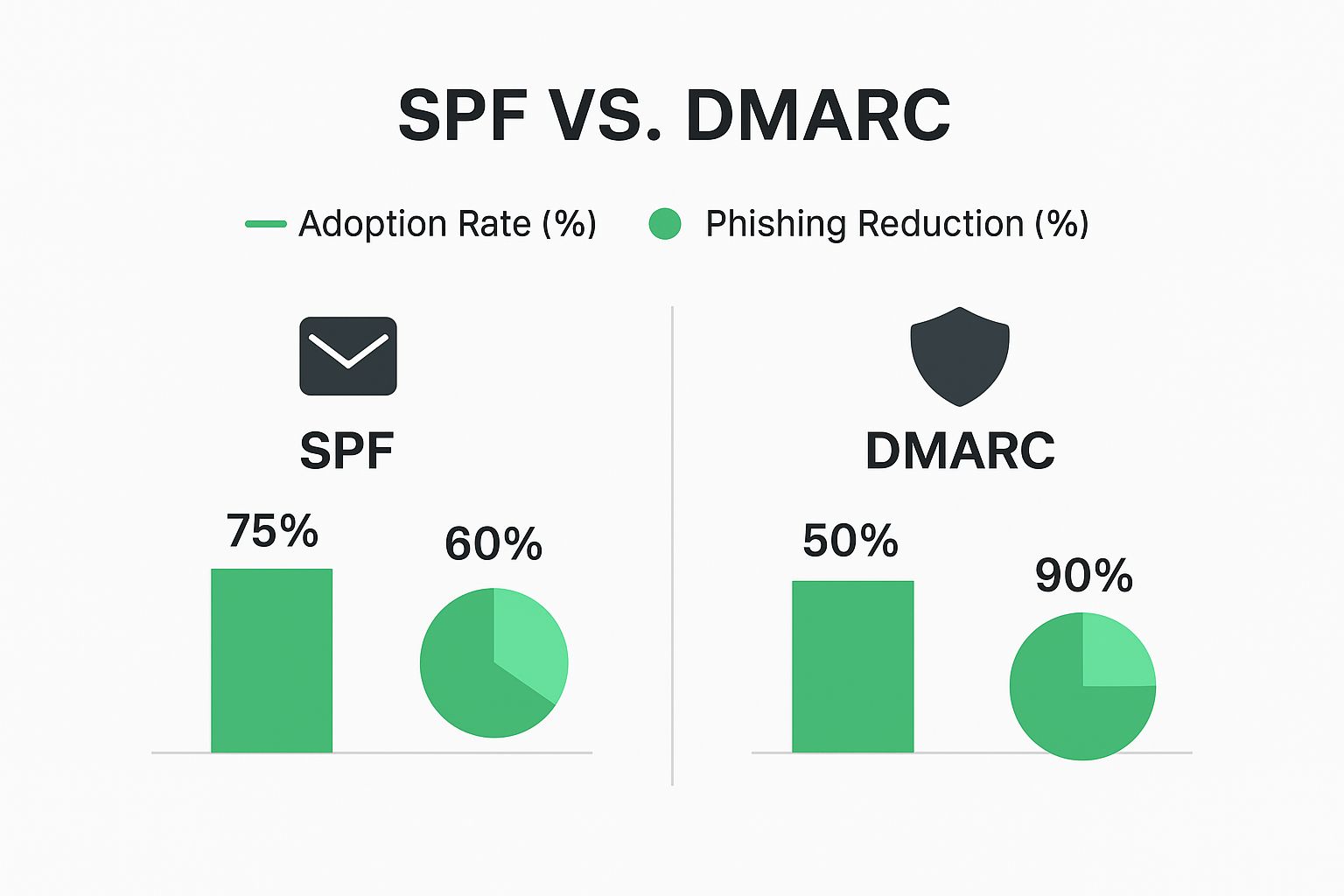
Impact: While 75% of organizations use SPF (resulting in 60% phishing reduction), DMARC adoption at 50% boasts a far more impressive 90% phishing reduction rate.
Setting up these protocols may seem technical, but many email providers offer simple setup guides. This is like setting up a burglar alarm for your email – it won’t stop all threats, but makes impersonation much harder.
Practical Email Encryption
Encryption scrambles email content, making it unreadable to anyone but the intended recipient.
- TLS (Transport Layer Security): Encrypts emails in transit between mail servers, protecting them as they travel across the internet.
- End-to-End Encryption: Encrypts emails on the sender’s device and decrypts them only on the recipient’s device, offering the highest level of security. Solutions like ProtonMail or Tutanota strike a balance between strong security and user-friendliness for small businesses.
The key is finding solutions that integrate smoothly with existing workflows. One-click encryption encourages adoption; complex systems gather dust.
Turning Employees Into Your Security Front Line

Your employees represent both a significant vulnerability and a crucial defense. The difference is effective security training that transforms behavior without resorting to fear-mongering.
Training That Addresses Real-World Threats
Effective training goes beyond general guidelines. It should address specific daily threats: sophisticated phishing attacks that mimic legitimate communications, handling sensitive customer information under data privacy regulations, and recognizing BEC tactics.
Phishing Simulations: Regular simulated phishing tests uncover vulnerabilities in a constructive, blame-free environment. These work like fire drills for your inbox – the goal is creating learning opportunities, not pointing fingers. Track who clicks, then provide specific training for those who need it. This personalized approach makes training stick.
Real-World Scenarios: Share stories of actual BEC attacks specific to your business type. If you handle financial transactions, work through examples of suspicious payment requests. This practical approach helps teams connect training to everyday work.
Training Effectiveness by Method
More interactive and engaging methods yield significantly better results:
| Training Method | Knowledge Retention | Threat Recognition | Cost |
| Basic email/PDF | 20-30% | Low | Low |
| In-person presentation | 40-50% | Moderate | Moderate |
| Phishing simulations | 70-80% | High | Moderate |
| Real-world scenarios | 75-85% | High | Moderate-High |
| Ongoing interactive training | 85-90% | Very High | High |
While interactive methods have higher upfront costs, long-term benefits in reduced risk make them worthwhile investments.
Building a Security-Minded Culture
Move beyond mere compliance to foster active engagement in security best practices. Employees should feel comfortable reporting suspicious emails without fear of reprisal. Explain why security measures exist – when people understand the reasoning, they’re more likely to follow rules.
Practical steps:
- Make reporting easy and consequence-free
- Reward employees for reporting suspicious emails, even false alarms
- Keep security top-of-mind with short quizzes, interactive games, or friendly competitions
- Incorporate security training into onboarding to set strong foundations from day one
- Provide regular refreshers as threats evolve
Advanced Protection Without Breaking the Budget
Automated Threat Detection
Automated threat detection works like a tireless virtual security guard monitoring your inbox 24/7. These systems use artificial intelligence to scrutinize incoming emails, catching suspicious content before it lands in employee inboxes.
These systems spot malicious links, dodgy attachments, and sneaky phishing attempts that slip through traditional filters. They learn and adapt over time, getting better at identifying emerging threats. This proactive approach minimizes human error risk, adding crucial always-on protection.
Choosing Solutions Based on Your Needs
The best approach depends on your specific business type, industry risks, and budget. An online retailer handling sensitive customer data has different needs than a local consulting firm.
| Solution Type | Protection Level | Cost | Implementation Difficulty | Best For |
| Basic email provider security | Moderate | Low | Easy | Very small businesses (1-5 employees) |
| Email provider + 2FA/authentication | Good | Low-Moderate | Easy-Moderate | Small businesses (5-20 employees) |
| Dedicated email security gateway | High | Moderate-High | Moderate | Growing businesses (20-50 employees) |
| Enterprise-grade platform | Very High | High | Complex | Larger organizations (50+ employees) |
Consider technical expertise required for setup and maintenance, customer support level, and solution scalability for future growth.
Backup and Recovery: Your Safety Net
Even with strong defenses, breaches can occur. A solid backup and recovery plan is non-negotiable. Regularly backing up email data means you can restore everything quickly and minimize disruption even in worst-case scenarios.
Look for secure, dependable, easy-to-manage solutions. Cloud-based options offer offsite storage benefits. Test backups regularly – this isn’t just about data recovery; it’s about business continuity. Quick email communication restoration keeps customers happy and operations running smoothly.
Your 90-Day Email Security Transformation Plan
Transforming your small business’s email security doesn’t require a complete overhaul. This focused, gradual 90-day plan balances immediate needs with long-term objectives.
Phase 1: Assessment and Quick Wins (Days 1-30)
Week 1 Quick Wins:
- Enable 2FA on every email account
- Review email provider security settings – ensure spam filters and antivirus protection are enabled and updated
- Conduct 15-minute team training on common phishing scams
Remainder of Month:
- Vulnerability Assessment: Evaluate existing email practices – do you have basic spam filters? Are employees trained to identify phishing?
- Implement Basic Authentication: Set up SPF, DKIM, and DMARC with your email provider
- Enforce Strong Passwords: Mandate strong, unique passwords; implement a password manager
- Initial Security Awareness Training: Focus on recognizing common phishing tactics and reporting suspicious emails
Phase 2: Building Stronger Defenses (Days 31-60)
- Explore Advanced Threat Protection: Consider upgrading your email provider or investing in a dedicated email security gateway
- Advanced Phishing Simulation: Run in-depth tests to identify team vulnerabilities and tailor training
- Advanced Security Awareness Training: Use real-world examples and simulated phishing tests
- Develop Incident Response Plan: Document what happens when someone clicks a bad link to contain damage quickly
- Create Written Security Policies: Address email usage, data handling, and incident response procedures
Phase 3: Continuous Improvement (Days 61-90)
- Regular Security Assessments: Identify emerging vulnerabilities and adapt strategies
- Ongoing Training and Education: Quarterly refreshers on new threats and best practices
- Refine and Test Incident Response Plan: Ensure your team knows how to react swiftly and efficiently
- Review and Update Security Policies: Stay current with evolving threats
- Explore Advanced Threat Detection: As your business grows, investigate automated systems
By following this plan and implementing these protections, you’ll considerably reduce vulnerability to email threats, protect valuable data, and establish a more secure foundation for your business’s future.
Ready to take control of your email security and protect your business? Start your free trial of Typewire today: Typewire Secure Email
The post Email Security for Small Business: Protect Your Data Now appeared first on Typewire.
Email Security for Small Business: Protect Your Data Now
Posted: 2025-05-24
What Is Spear Phishing and Why Targeted Attacks Hit Harder
Posted: 2026-10-16
What Is Smishing and How to Avoid SMS Phishing
Posted: 2026-10-13
How to Whitelist an Email Address (So You Stop Missing Messages)
Posted: 2026-10-06
Email Bounce Explained: Soft vs Hard Bounces & How to Fix Them
Posted: 2026-10-02
Which Secure Email Provider Fits Your Workflow? 10 Options by Use Case
Posted: 2026-09-29
Personal Data Privacy: Why Your Email Is the Master Key to Your Digital Life
Posted: 2026-09-24
Secure Email Gateway Guide: Do You Need One?
Posted: 2026-09-23
Average Email Deliverability Rate: 2026 Benchmarks
Posted: 2026-09-18