Email Security for Business Guide
Effective email security for business isn’t just about software or IT checklists. At its heart, it’s a comprehensive strategy to protect your company’s most used communication channel from being turned against you.
Your Company’s Digital Front Door
Think of your email system as a postcard traveling through the mail. Anyone who handles it can read what’s written. As it moves across the internet, anyone with the right tools can potentially access its contents. This fundamental vulnerability makes standard email a terrible choice for confidential business information.
A solid email security strategy is your digital gatekeeper – checking IDs, inspecting packages, and distinguishing between welcome visitors and threats. Without it, you’re leaving your organization open to financial scams, data theft, and reputational damage that can take years to repair.
Attackers craft malicious emails to look like mundane shipping notifications or casual team updates, blending in with inbox noise to catch people off guard. This is why a simple spam filter isn’t enough. You need multi-layered defense that addresses threats from every angle.
The Core Pillars of Business Email Security
A truly resilient security plan is built on four fundamental components working in tandem:
- Threat Prevention: This is your first line of defense, proactively stopping threats like phishing and malware before they even have a chance to land in an employee’s inbox.
- Authentication and Identity Verification: This pillar focuses on making sure senders are who they say they are. It prevents criminals from faking your company’s domain or impersonating a trusted executive.
- Employee Awareness and Training: Your team is a critical part of your defense. Proper training gives them the skills to spot suspicious messages, turning your workforce into a human firewall.
- Incident Response: No defense is perfect. This is your action plan for when a threat gets through, allowing you to contain the breach quickly and minimize the damage.
Understanding Modern Email Attacks
Modern attacks don’t target systems – they target people by exploiting trust, urgency, and human error. Many sail past traditional filters because they don’t carry obvious malware. Instead, they weaponize social engineering to convince employees to hand over information or authorize fraudulent payments.
The Financial Threat of Business Email Compromise (BEC)
BEC attacks have become a leading cause of financial loss. Research shows BEC schemes account for roughly 73% of all reported cyber incidents. About 12.9% of employees report their organization lost money directly to a BEC attack – nearly one in eight companies. For businesses using managed service providers, the figure jumps to 21.6%.
Attackers often push for fraudulent wire transfers, with the average demand hitting $24,586. They rely on pretexting – inventing believable stories to make requests seem legitimate. This tactic has nearly doubled in frequency because it hijacks established trust and authority.
Common Attack Scenarios
The Fake Invoice: Accounts payable receives an email from a regular supplier with an invoice showing new banking details. The branding looks perfect, so they process payment – sending money straight to criminals.
The CEO’s Urgent Request: Finance receives an email from the CEO who is “stuck in a meeting and can’t be disturbed,” demanding an immediate wire transfer for a time-sensitive deal. The pressure makes employees skip verification steps.
Credential Phishing: An employee gets a warning about “suspicious activity” on their account and must verify their login. The link leads to a perfect copy of your company’s login page. When they enter credentials, they’ve handed attackers the keys.
These examples show how attackers twist everyday business routines against you, succeeding through psychological tactics rather than technical exploits.
Why Your Spam Filter Is Not Enough
Standard spam filters work like bouncers checking for obvious red flags – known malware or suspicious attachments. But modern attackers have shifted to “payload-free” attacks designed to bypass these defenses. They send QR codes to phishing sites, links to legitimate cloud documents with hidden threats, or simple urgent requests requiring no malicious files.
The Problem With Signature-Based Detection
Traditional filters scan against a database of known threats. If they find a match, they block it. But this fails spectacularly against new or creative attacks.
A recent analysis of over one million threats that slipped past email filters revealed a startling pattern: 99% relied on phishing links or social engineering, not old-school malware. Attackers weaponize legitimate online services for file sharing or forms, creating links that look safe to both employees and security filters. You can discover more insights about these evolving threats and their impact on email security.
A Smarter Approach to Email Defense
Modern, AI-powered security analyzes context, behavior, and intent behind every email. Instead of checking against a list of known criminals, these systems learn your organization’s normal patterns – who typically emails whom, what requests are standard, and the language your team uses.
This contextual awareness spots anomalies signature-based filters would miss:
- Impersonation attempts from strange addresses or unusual times
- Sudden demands for wire transfers to new bank accounts
- Urgent, threatening, or overly emotional language designed to rush decisions
By focusing on behavior, these systems neutralize sophisticated social engineering attacks even without malicious files.
To get a better handle on these dangers, you might be interested in our complete defense guide on email security threats.
How To Build a Digital Fortress
There’s no magic bullet for email security. The real secret is constructing a digital fortress with multiple, overlapping layers of defense. If one layer fails or is bypassed, another stops the threat.
Lock the Gates With Authentication
Email authentication protocols prove that emails actually came from you, stopping attackers from impersonating your company. These are non-negotiable:
SPF (Sender Policy Framework): Publishes a list of authorized mail servers permitted to send emails on behalf of your domain.
DKIM (DomainKeys Identified Mail): Adds a tamper-proof digital signature to every email. If a criminal intercepts and changes your message, the signature breaks, revealing the forgery.
DMARC (Domain-based Message Authentication, Reporting, and Conformance): Tells mail servers what to do with emails that fail SPF or DKIM checks – quarantine or reject them.
Implementing these three protocols is the most effective way to shut down domain spoofing and protect customers from phishing done in your name.
Empower Your People as Sentries
Your employees are sentries on the walls, and their awareness is one of your most critical assets. A well-trained person can spot sophisticated threats that software might miss.
Phishing remains the number one cause of security breaches, involved in 36% of all incidents. With 3.4 billion malicious phishing emails sent daily and 94% of malware infections starting with phishing, your team is your first line of defense. In fact, roughly 95% of all data breaches involve some type of human mistake.
Good training empowers employees with skills to spot and report suspicious emails. The goal isn’t to scare people – it’s to transform them from potential targets into active threat hunters. You can find more data on the prevalence and cost of phishing attacks from TechMagic.
Standardize Your Defensive Procedures
Create clear, mandatory internal procedures designed to shut down the most common attacks. Create ironclad rules for high-risk actions:
- Any request to change vendor payment details or make urgent wire transfers must be verified through a second channel
- Pick up the phone and call a known, trusted contact number (never one from the email itself)
- Require out-of-band verification for requests involving money transfers, payment information changes, or sharing sensitive data
This simple, process-driven step derails the attacker’s game plan. It doesn’t matter how convincing a fraudulent email looks if your team is required to verify it offline.
Understanding Secure Email Technology
The foundation of secure business email is End-to-End Encryption (E2EE). Think of it like sending a valuable package in an unbreakable lockbox. You lock it with a unique key, and only your recipient has the matching key to open it. Along the way, no one – not intermediaries, not even the email company itself – can see what’s inside.
From the moment you click “send” until your recipient opens it, your message is unreadable code to anyone else. This is the gold standard for email privacy.
Beyond Encryption: Your Layered Defenses
While encryption is the foundation, robust platforms include additional critical features:
Two-Factor Authentication (2FA): Requires a second piece of proof – usually a code sent to your phone – to verify identity. Even if someone steals your password, they still can’t access the account.
Intelligent Anti-Phishing Filters: Use advanced analysis to spot fraud telltales, automatically catching and isolating dangerous emails before they reach employees.
Advanced Malware Scanning: Scans every attachment for known threats, blocking dangerous files before anyone can click on them.
Time-of-Click Link Analysis: Checks links again at the exact moment a user clicks, providing real-time protection against weaponized URLs that change destinations after initial delivery.
Post-Delivery Remediation: Automatically finds and removes malicious emails from every user’s inbox after threats are identified, stopping potential disasters in their tracks.
Choosing Modern Email Security Tools
Modern email security platforms use artificial intelligence to analyze behaviour and context, catching threats that don’t carry obvious malware.
Core Capabilities Required
- AI-Powered Threat Detection: Analyzes communication patterns, sender reputation, language, and context to spot anomalies instead of just checking against known threat lists.
- Robust Impersonation Protection: Identifies and blocks attempts to mimic trusted people – executives or key vendors – by looking for subtle clues like mismatched display names, lookalike domains, and unusual sending patterns.
- Privacy-First Hosting: Where your data lives matters. The provider’s jurisdiction determines which laws have authority over your information. Providers in privacy-friendly countries (Switzerland, Germany) offer stronger legal protections than those in regions with expansive surveillance programs.
- Compliance Certifications: For regulated industries (healthcare, finance), verify providers can demonstrate HIPAA, GDPR, or other required compliance.
Linking Security Features to Legal Requirements
For many businesses, secure email isn’t optional – it’s legally mandated. HIPAA and GDPR have strict rules about protecting sensitive information, with crippling fines for violations.
- End-to-End Encryption (E2EE): Directly addresses core data protection principles of regulations like GDPR by ensuring only sender and recipient can read messages.
- Data Residency Controls: Many laws dictate data must stay within specific countries or regions. Choose providers that let you control server locations.
- Detailed Access Logs: If a breach occurs, clear records of who accessed what and when create an undeniable audit trail crucial for investigations and proving compliance.
Your Business Security Checklist
Technology and Authentication
- Lock Down Your Domain: Implement SPF, DKIM, and DMARC to prevent attackers from spoofing your domain.
- Pick a Modern Security Platform: Choose AI-powered detection that understands behavior and context, not just signature matching.
- Insist on Privacy-First Hosting: Ensure your sensitive communications stay under your control and aren’t scanned or sold to third parties.
People and Processes
- Make Training an Ongoing Habit: Run regular phishing simulations and security training to keep skills sharp as threats evolve.
- Create “Stop and Verify” Rules: Require out-of-band verification for any request involving money transfers, changing payment information, or sharing sensitive data – a quick phone call to a legitimate number, not one from the email.
- Build a “See Something, Say Something” Culture: Make it easy and safe for employees to report suspicious emails. A fast report can shut down an attack before it spreads.
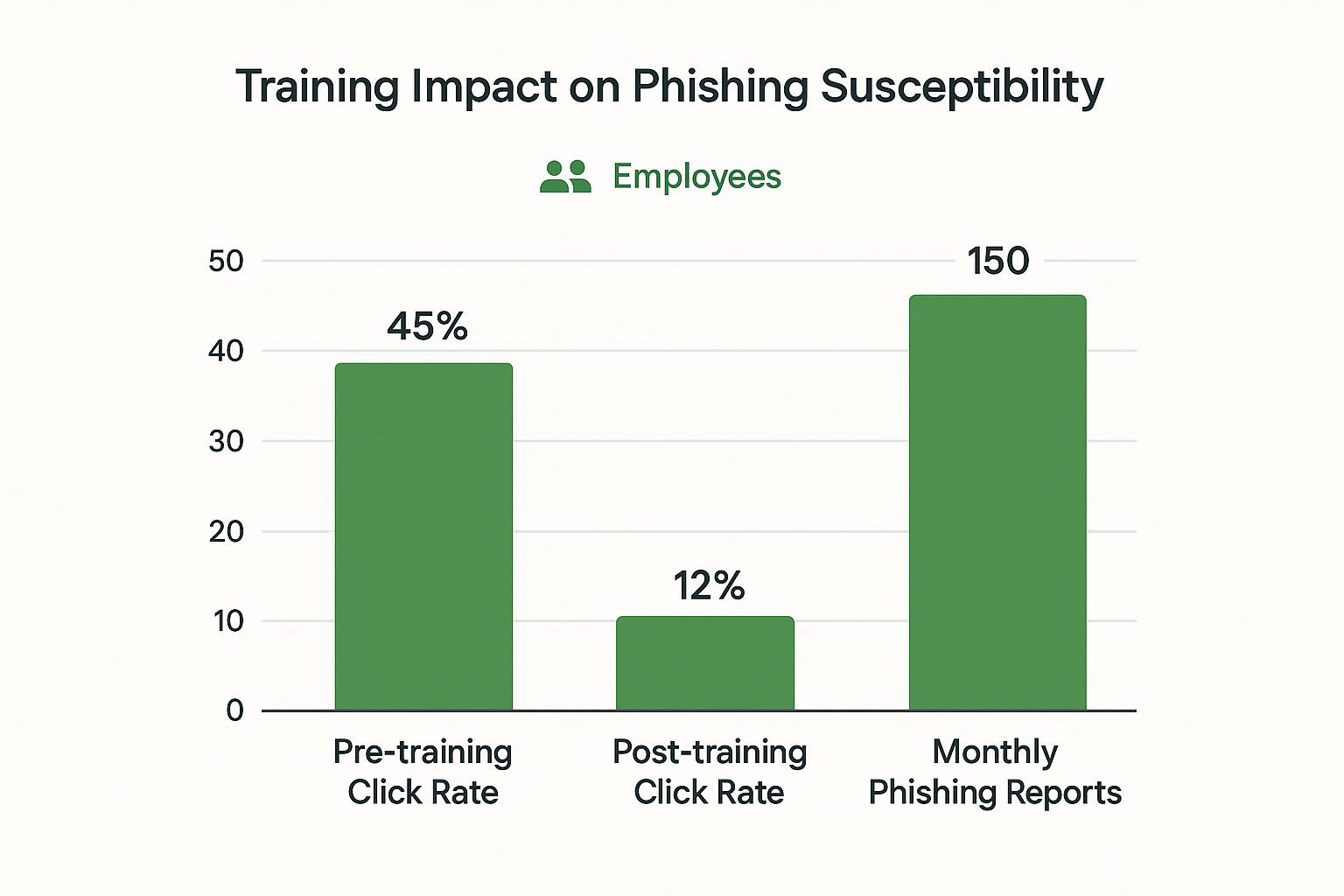
This image shows the very real impact of combining advanced tools with ongoing employee training. The results speak for themselves: a huge drop in risk and a big boost in security awareness.
Your Path Forward
Strong email security isn’t a project you finish; it’s a commitment you live by. It requires continuous attention, regular check-ins, and the willingness to adapt as new threats emerge. By following this checklist, you’re not just buying a piece of software—you’re adopting a comprehensive security strategy.
This blended approach—marrying technology with empowered people and standardized processes—is the key to protecting your company’s money, data, and hard-earned reputation. In a world where email is still the #1 way attackers get in, taking proactive control is the best way to ensure your business is built to last.
Frequently Asked Questions

How Is E2EE Different From Regular Email That Uses SSL/TLS?
SSL/TLS encrypts the connection between your computer and the email server, like a secure tunnel. But it doesn’t protect the message itself once it’s sitting on that server or traveling between servers. True secure email uses end-to-end encryption (E2EE), scrambling the actual content from the moment you hit “send” until your recipient opens it. Only sender and recipient have the key, providing a much higher level of privacy.
Is Email Security a Major Concern for a Small Business?
Absolutely. Cybercriminals specifically target small businesses because they often have fewer security resources, making them softer targets. A single successful BEC attack or stolen credentials can be devastating for a small business, making strong email security critical regardless of company size.
My Employees Are Smart. Do We Still Need Training?
Yes. Even the sharpest person can be tricked by sophisticated social engineering attacks. Modern phishing scams masterfully create false urgency or mimic authority to get people to click before they think. Training equips your team to spot the latest tactics and report them, turning employees from potential vulnerability into your first line of defense.
What Is DMARC and Is It Hard To Set Up?
DMARC (Domain-based Message Authentication, Reporting, and Conformance) stops scammers from “spoofing” your domain – sending malicious emails that look like they came from your company. While setup involves editing your domain’s DNS records, it’s gotten much easier. Many modern security platforms offer guided setup wizards that make implementing DMARC manageable, even without a dedicated IT security expert.
Ready to take control of your digital communications? Typewire offers secure, private email hosting with advanced anti-spam and virus protection built-in. Start your 7-day free trial and experience true peace of mind. Learn more at the Typewire website.
The post Email Security for Business Guide appeared first on Typewire.
Email Security for Business Guide
Posted: 2025-07-26
What Is Spear Phishing and Why Targeted Attacks Hit Harder
Posted: 2026-10-16
What Is Smishing and How to Avoid SMS Phishing
Posted: 2026-10-13
How to Whitelist an Email Address (So You Stop Missing Messages)
Posted: 2026-10-06
Email Bounce Explained: Soft vs Hard Bounces & How to Fix Them
Posted: 2026-10-02
Which Secure Email Provider Fits Your Workflow? 10 Options by Use Case
Posted: 2026-09-29
Personal Data Privacy: Why Your Email Is the Master Key to Your Digital Life
Posted: 2026-09-24
Secure Email Gateway Guide: Do You Need One?
Posted: 2026-09-23
Average Email Deliverability Rate: 2026 Benchmarks
Posted: 2026-09-18