How to Get Spam Emails to Stop and Reclaim Your Inbox
If you want to stop spam for good, you need a solid game plan. It’s not just about hitting the "report spam" button. A truly effective strategy involves a mix of immediate actions, smart email habits, and choosing the right email host—one that puts your privacy and security ahead of everything else.
How to Stop Spam Emails: A Practical Guide

Does your inbox feel like a constant battleground? You're definitely not alone. That relentless wave of junk mail is more than just a daily nuisance; it’s a direct threat to your email security and a violation of your digital privacy. The hard truth is there’s no magic button to stop spam. Instead, you need a layered approach that prioritizes your security from the ground up.
This guide goes beyond the basic tips. We’ll cover the practical, effective tactics you can use right now, from immediate cleanup actions to long-term protective measures. You'll see how your everyday habits, your email client’s settings, and, most importantly, your choice of email provider all work together to reclaim your inbox.
Understanding the Sheer Scale of the Spam Problem
The fight against spam can feel overwhelming because the numbers are just staggering. By 2025, it's projected that 376.4 billion emails will be sent and received worldwide every single day.
Here's the kicker: roughly 46-47% of all that email traffic is spam. That’s about 176 billion junk messages flooding inboxes across the globe daily. This isn't just random noise; it's a massive, profitable industry, which is why it’s so hard to stamp out. You can find more of these eye-opening email statistics on debounce.com.
Your email provider is your first and most important line of defense. Free services often treat your data as the product, which can lead to more exposure and privacy risks. A privacy-first hosted email platform, on the other hand, builds its entire business model on protecting you.
Adopting a Proactive Security Mindset
To make a real dent, you need to shift from a reactive "delete and forget" habit to a proactive security mindset. This means getting to the root of why you receive spam and taking concrete steps to shield your most important digital asset—your email address.
This guide will walk you through a privacy-first approach that finally puts you back in control. You’ll learn how to:
- Guard your primary email address carefully, using aliases or secondary accounts for newsletters, online shopping, and other sign-ups.
- Master your email client’s tools to build an automated defense system that catches junk before it ever hits your inbox.
- Recognize the security features that truly matter, so you can choose a hosted email platform that actively fights on your behalf.
Forget the temporary band-aids. By focusing on these core principles, you can build a resilient system that dramatically cuts down on junk mail for good.
To help you visualize this layered approach, here’s a quick overview of the strategies we'll be covering.
Your Anti-Spam Strategy At a Glance
| Strategy Level | Actions You Can Take | Primary Goal |
|---|---|---|
| Immediate Response | Marking as spam, blocking senders, never engaging with junk mail. | Clean up your current inbox and train your spam filter. |
| Email Client Rules | Creating custom filters and rules to automatically sort or delete mail. | Automate your defenses and keep your primary inbox clear. |
| Proactive Protection | Using email aliases, unsubscribing carefully, protecting your address. | Reduce your exposure and stop spam before it starts. |
| Advanced Defense | Understanding SPF, DKIM, and DMARC for domain-level security. | Prevent email spoofing and protect your business's reputation. |
| Platform Choice | Migrating to a privacy-first email host with built-in protections. | Get institutional-grade security that works for you 24/7. |
Each of these layers builds on the last, creating a comprehensive shield that keeps your inbox clean and your data secure. Let's dive into the first set of actions you can take right now.
Immediate Actions for a Cleaner Inbox Today
If your inbox is completely out of control, you can start making a real dent in the junk mail with just a few strategic moves. We’re not just talking about deleting emails; these are active steps that will reduce the spam hitting your inbox and beef up your email security. The idea is to make your address a much less attractive target for spammers.
One of the most powerful things you can do right away is get intentional about how you handle every single unwanted message. It all starts with knowing the critical difference between unsubscribing and reporting something as spam.
Unsubscribe vs. Report: Knowing When to Use Each
Making the right call here is fundamental to stopping the flood. One action cleans your inbox, but the other can accidentally make the problem a whole lot worse, compromising your email privacy.
-
Unsubscribe from Legitimate Senders: If you actually signed up for a newsletter from a company you know—a retailer, a service you use, a blog you follow—then the "unsubscribe" link is your best friend. It’s a direct, safe request to be taken off their list, and legitimate businesses are legally required to honor it.
-
Report Illegitimate Spam: For those messages you never asked for, like fake lottery winnings, sketchy invoices, or obvious scams, never click unsubscribe. Clicking that link often just confirms to the sender that your email address is active, inviting even more junk mail. Instead, hit your email client’s "Report Spam" or "Mark as Junk" button. This not only moves the email out of sight but also helps train your provider’s filters to block similar messages down the road.
This distinction is more important than ever because phishing, a particularly nasty form of spam, is a massive problem. A staggering 3.4 billion phishing emails are sent across the globe every single day, making it a key factor in over 80% of all reported cyberattacks. To protect yourself from these increasingly sneaky threats, it’s worth exploring some practical phishing protection strategies.
Protect Your Primary Email Address
Your main email address is a valuable piece of your digital identity—treat it that way. Avoid plastering it on public social media profiles, forums, or websites where bots can easily find and scrape it. Every exposure increases your risk.
A really effective tactic is to use disposable or alias email addresses for one-off sign-ups. Need an email to download a free guide or enter a contest? Use a secondary address. If that alias gets hammered with spam, you can just nuke it without any impact on your primary account.
Think of your main email as your home address and a disposable email as a P.O. box. You give out the P.O. box to services you don't fully trust, keeping your actual home address private and secure. This simple separation is a powerful privacy defense.
Scenario: A Sudden Flood of Spam
Let's say you just bought something from a new online shop, and within 24 hours, your inbox is slammed with junk from companies you've never heard of. This is a classic sign that the store either sold your data or had a security breach.
Here’s your immediate game plan:
- Don't Engage: Resist the urge to open or click anything in these new spam messages. Every interaction is a risk.
- Report Everything: Methodically go through each new junk email and mark it as spam. This is you teaching your email filter what to block.
- Create a Filter: If you spot a common word or phrase in the subject lines (like "Exclusive Offer" or the store's name), create a rule in your email client to automatically send those messages straight to the trash.
Taking these steps right away can shut down a spam surge before it becomes an unmanageable, long-term headache. For a deeper look at cleanup tactics, check out our guide on how to delete spam mail and clean your inbox.
Mastering Your Email Client's Rules and Filters
Just reporting spam is playing defense. If you want to get ahead of the constant stream of junk mail, you need to turn your email client into a proactive gatekeeper. Most of us barely scratch the surface of what platforms like Gmail, Outlook, or Apple Mail can really do. The secret is moving beyond the basics and creating custom rules—this is how you teach your inbox to think like you and stop spam before it ever distracts you.
Think of these rules as your own personal security guard for your inbox, working around the clock. Instead of manually swatting away the same junk mail day after day, you can build a system that automatically handles it based on triggers you define. It’s about taking back control and turning a simple mailbox into a powerful defense tool.
Modern spam filters are already doing some heavy lifting, thanks to AI. Out of the 376.4 billion emails flying around the internet daily, only about 10.5% of spam even sneaks into the spam folder, with another 6.4% getting blocked outright. That’s a massive improvement from 2017, when spam accounted for a staggering 56.6% of all email traffic. While that number is projected to drop to 46.8% by 2025, you can still give your own filters a serious boost. Provider data shows that consistently marking spam can improve a filter's accuracy by as much as 40% over a few months. You can dive deeper into these trends over on emailwarmup.com.
Creating Your First Line of Defense with Smart Rules
The trick is to spot the patterns in the spam you receive and then build rules to catch them. This isn't nearly as technical as it sounds. Most email clients use a simple "if this, then that" logic that anyone can set up.
Here are a few practical examples you can put to work right away.
-
Filter by Spammy Keywords: Spammers are lazy and often reuse the same tired phrases. You can set up a rule that automatically trashes any email with words like "claim your prize," "congratulations," or "act now" in the subject line or body.
-
Target Suspicious Domains: Ever notice junk mail coming from bizarre domain extensions? You can create a filter to block all emails from specific top-level domains (TLDs) like
.xyz,.top, or.buzz, which are notorious havens for spammers. -
Isolate Emails with No Subject Line: A legitimate email almost always has a subject. A common spammer tactic is to leave the subject line blank to sneak past basic keyword filters. A simple rule that flags or deletes any email with no subject can catch a surprising amount of junk.
Setting up these rules is like building a digital moat around your inbox. Each rule is another layer of defense that prevents unwanted messages from ever reaching the main keep, preserving your focus for the emails that actually matter.
If you're curious about the technology powering these defenses, our guide on what spam filtering is provides a deeper look into how these systems keep your email secure.
Real-World Scenario: From Spam Keywords to a Custom Filter
Let's say you keep getting emails about some "miracle" health supplement you never signed up for. The sender's address changes every single time, making the block button completely useless. But then you notice a pattern: every single email uses the phrase "exclusive formula" in the subject line.
This is the perfect opening for a custom rule. In your email client's settings, you'd create a new filter with a couple of simple conditions:
- Condition: If an incoming email's Subject contains the words "exclusive formula".
- Action: Automatically Move to Trash and Mark as Read.
And just like that, you've solved the problem for good. It doesn't matter what address they use next—any email matching that pattern will be gone before you ever lay eyes on it.
Best Practices for Effective Rule Management
To really get the most out of your filters, it helps to keep a few things in mind. A little bit of organization ensures your rules stay effective without accidentally catching important messages.
-
Start Specific, Then Go Broad: Begin with very narrow rules, like filtering a particular sender or an exact phrase. As you get more comfortable, you can create broader rules, but be careful not to make them so general that they catch legitimate emails. For instance, a rule blocking any email with the word "offer" could be a big problem.
-
Regularly Review Your Rules: Every quarter or so, take five minutes to look through your active filters. Are they still relevant? Are any of them a little too aggressive? You might find a rule you created six months ago is no longer needed or needs a tweak.
-
Use Folders, Not Just Deletion: Not every filtered email needs to be sent straight to the trash. You can create rules to automatically sort newsletters into a "Reading" folder or receipts into a "Finances" folder. This doesn't just stop spam; it helps organize your entire inbox.
Advanced Protection for Businesses and Power Users
While personal inbox rules are great for cleanup, businesses face a whole different level of threat. Spam isn't just an annoyance; it’s a direct hit to your email security and brand reputation.
The real danger begins when spammers start impersonating your domain to send junk mail. This can quickly erode customer trust and, worse, get your legitimate emails blacklisted. To fight back, you have to move beyond the inbox and start securing your email at the server level.
Thankfully, there's a powerful set of tools designed for this exact problem: Sender Policy Framework (SPF), DomainKeys Identified Mail (DKIM), and Domain-based Message Authentication, Reporting, and Conformance (DMARC). Think of them as the digital equivalent of a certified signature and a tamper-proof seal for every email you send.
Getting a Handle on Server-Side Authentication
These three protocols work in concert to prove that an email claiming to come from your domain was actually sent by you. They directly counter a favorite spammer tactic called email spoofing, where a fraudster forges the "From" address to trick recipients into thinking the message is from a trusted source.
Without these safeguards, anyone could blast out emails that look like they came from yourcompany.com. This makes phishing attacks and junk mail campaigns dangerously convincing.
Let's break down what each protocol brings to the table.
-
SPF (Sender Policy Framework): This is essentially a public guest list for your domain. You create a special record listing all the servers and IP addresses authorized to send emails on your behalf. When an email arrives, the recipient's server checks your SPF record. If the sending server isn't on the list, the email is immediately flagged as suspicious.
-
DKIM (DomainKeys Identified Mail): If SPF is the guest list, think of DKIM as the tamper-proof seal on the envelope. It attaches a unique, encrypted digital signature to every outgoing email. The receiving server uses a public key to verify that the signature is legit and that the message hasn't been altered along the way. It’s all about message integrity.
-
DMARC (Domain-based Message Authentication, Reporting, and Conformance): DMARC is the security director who ties SPF and DKIM together. It gives clear instructions to other mail servers on what to do if an email fails authentication—either monitor it, quarantine it (send to spam), or reject it completely. DMARC also sends back reports, giving you a clear view of who is trying to send email from your domain.
The following table offers a quick side-by-side comparison of these essential tools.
Email Authentication Protocols Explained
This simple table breaks down the three key server-side tools that stop email spoofing and spam.
| Protocol | What It Does | Why It Matters for Spam |
|---|---|---|
| SPF | Publishes a list of servers authorized to send email for your domain. | Prevents spammers from using unauthorized servers to send mail that looks like it's from you. |
| DKIM | Adds a unique digital signature to emails to verify they haven't been tampered with. | Ensures the email content is authentic and hasn't been altered for a phishing attack. |
| DMARC | Tells receiving servers what to do with unauthenticated emails and provides reports on activity. | Enforces your security policy and gives you visibility into spoofing attempts on your domain. |
Together, these protocols create a layered defense that is far more effective than any single tool on its own.
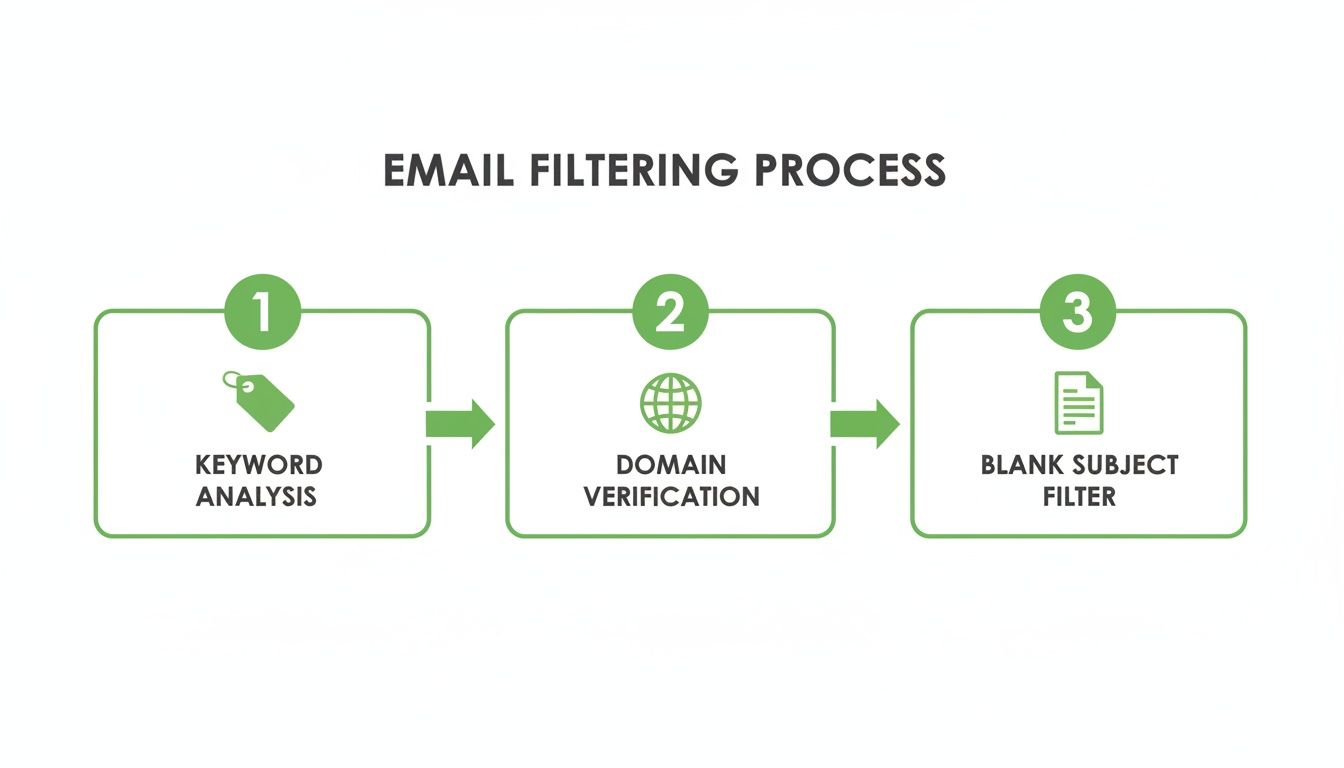
As you can see, robust domain verification—powered by SPF, DKIM, and DMARC—is a critical middle layer that catches sophisticated threats that simple keyword filters might miss.
Why Does This Matter for Stopping Spam?
Properly implementing these three protocols is one of the single most powerful things a business can do to stop spam at its source. It’s a proactive defense that protects your brand's reputation by making it incredibly difficult for anyone to use your domain for malicious campaigns.
By authenticating your own emails, you make it significantly harder for spammers to impersonate you. This, in turn, reduces the amount of phishing and junk mail that your customers and partners receive under your name. You're not just protecting yourself; you're helping clean up the entire email ecosystem.
While setting these up involves DNS changes, you don’t have to be a tech wizard to get it done. The key is knowing what to ask for. Start a conversation with your IT department or a privacy-first email host like Typewire to ensure they are configured correctly. A good email provider will often handle this for you, giving you a secure foundation right from the start.
Choosing a Privacy-First Hosted Email Platform

So far, we’ve covered all the tactics you can use within your current inbox. But what if the real problem isn't just the spam itself, but the platform you're using? Your choice of email provider is your single most important line of defense. For anyone truly serious about stopping spam for good, switching to a privacy-first hosted email platform can be a total game-changer.
Think about the business model of most free email services. If you aren't paying for the product, it’s a good bet that you are the product. Many of these providers scan your email content to build advertising profiles, and their terms of service are often surprisingly lax about sharing your data. This environment, where your personal information is a commodity, is a breeding ground for spam.
A privacy-focused provider completely flips this model around. Their entire business is built on securing your information, not selling it. That fundamental difference in philosophy results in a far more secure and spam-resistant experience right from the start.
What Defines a Privacy-First Email Host
A truly private email service does more than just offer an ad-free inbox. It’s about a deep, structural commitment to your security. When you’re looking for a new provider, you're not just buying a service; you're finding a partner that actively works to make you a terrible target for spammers and cybercriminals.
These platforms are all about blocking threats at the source, long before they ever have a chance to land in your inbox. They invest in infrastructure and technology designed to protect, not to profile.
By choosing a provider whose business model aligns with your privacy goals, you're investing in a system designed to repel spam by default. Security isn't an afterthought or a premium add-on; it's the core foundation of the service.
This proactive approach creates an environment where junk mail simply can’t get a foothold, leaving you with a cleaner, safer, and more focused way to communicate.
Essential Security Features to Look For
When you start comparing providers, it's easy to get lost in marketing jargon. To cut through the noise, focus on a few non-negotiable features that have a direct impact on your email security and privacy. These are the pillars of a truly secure platform.
-
Aggressive and Intelligent Anti-Spam: Look for services that go way beyond basic keyword filtering. The best ones use multi-layered systems that analyze sender reputation, message structure, and behavioral patterns to shut down sophisticated spam and phishing attempts in real-time.
-
Built-in Alias and Disposable Address Support: We’ve already talked about how powerful aliases are. A privacy-first host makes creating and managing them simple. Some, like Apple's "Hide My Email", even generate random addresses on the fly, which is perfect for shielding your real address from data breaches and shady mailing lists.
-
End-to-End Encryption (E2EE): While not a direct spam-fighter, E2EE is a clear sign of a provider's commitment to privacy. It ensures only you and the recipient can read your messages, protecting your communications from being scanned by anyone—including the provider themselves.
-
Flawless Server-Side Authentication: A secure host should have SPF, DKIM, and DMARC perfectly configured on their own mail servers. They should also make it easy for you to set these up for your custom domain. This prevents their platform—and your account—from being used in spoofing attacks.
Making the switch might feel like a big step, but the long-term payoff is huge. If you want to dive deeper, our guide to private email hosting services offers a more detailed comparison of what to look for.
The Real-World Impact of a Secure Host
Imagine an inbox where you almost never think about junk mail. Phishing attempts are practically nonexistent because they're stopped at the server level. You can sign up for a new service without worrying that your primary email address will end up on a list sold to data brokers. This is the daily reality of using a dedicated, private email platform.
For example, a service like Typewire operates on its own privately owned data centers, completely avoiding third-party cloud providers. This gives them total control over their network and data security—a critical advantage in fighting spam. When your provider owns the entire security stack, from the server hardware to the filtering software, they can build a much more robust and integrated defense system.
Ultimately, choosing a privacy-first host is the single most powerful move you can make to reclaim your inbox. It shifts you from constantly reacting to spam to a place where a secure foundation is working for you 24/7.
A Few Common Questions About Stopping Spam
Even when you've got a good system going, a few questions always pop up. Let's dig into some of the most common ones to set the right expectations and reinforce good email habits.
How Long Until I Actually See Less Spam?
This is the big one, and honestly, the answer is: it depends. Think of it less like flipping a switch and more like turning a big ship. Different actions yield results on different timelines.
- Quick Hits (Today to 1 Week): You'll feel the most immediate relief from the simple stuff. Unsubscribing from legitimate newsletters you don't read anymore, blocking obvious pests, and reporting junk will clean up your inbox right away.
- The Training Period (2 to 4 Weeks): When you consistently mark emails as spam, you're essentially teaching your email client's filter what you don't want to see. This isn't instant. It usually takes a few weeks of consistent "training" before the algorithm gets really good at catching things on its own.
- The Long Game (1 Month and Beyond): The most significant, lasting drop in spam comes from the bigger moves. Migrating to a privacy-focused email host or getting server-side protections like DMARC set up correctly can take some time to kick in, but the payoff is a huge, permanent reduction in junk.
It’s a bit like weeding a garden. Pulling the big ones gives you immediate satisfaction, but improving the soil and putting up a fence is what keeps them from coming back.
Can Spammers Tell If I Open Their Emails?
Unfortunately, yes, they often can. They use a sneaky little trick called a tracking pixel. This violates your privacy by monitoring your activity without your consent.
It’s a tiny, invisible image, sometimes just 1×1 pixel, hidden in the email's code. When your email app loads images, it sends a request back to the spammer's server to fetch that pixel. That tiny request is all they need.
It confirms a few things for them:
- Your email address is live and actively used.
- You opened their message, making you a more promising target.
- It often logs your IP address, giving them a rough idea of your location.
This is exactly why your choice of email service matters so much. Many modern, privacy-respecting platforms now block images from unknown senders by default. This simple setting breaks the entire tracking pixel system. If the pixel never loads, the spammer never knows you saw their message, and your email address becomes a dead end for them.
A privacy-first email host is your best defense here. By automatically blocking tracking pixels, it cuts off the feedback loop that spammers rely on to validate their lists. You become a much less valuable target overnight.
Is Paying for an Email Service Really Worth It?
If you're serious about taking back your inbox and protecting your privacy, the answer is an absolute yes. Free services are convenient, but they come with a hidden price tag—your data. When you pay for a hosted email service, you change the entire dynamic.
Here’s what that money actually gets you:
- Genuinely Better Spam Filtering: Premium providers live and die by the quality of their service. They invest heavily in sophisticated, multi-layered filtering because their reputation is on the line. They're not just blocking spam; they're building an infrastructure designed to keep it out entirely.
- A No-Ads, No-Tracking Zone: You are the customer, not the product they sell to advertisers. A paid service has zero incentive to scan your private messages for keywords, which is a massive win for your privacy.
- Real Security and Support: Paying for a service means you have a team of people whose job is to keep the platform secure and help you when you need it. They handle the complex server configurations and stay on top of new threats so you don't have to.
Ultimately, investing in a secure email host is an investment in your own digital peace of mind. It’s the single most effective step you can take for a clean, private, and permanent solution to the spam problem.
Ready to make the switch to a truly private and secure inbox? With advanced anti-spam protection, no ads, and a strict no-tracking policy, Typewire puts you back in control of your email. Start your 7-day free trial and experience the difference today.
How to Get Spam Emails to Stop and Reclaim Your Inbox
Posted: 2025-12-17
What Is Data Mining: Protecting Your Email Privacy and Security
Posted: 2025-12-27
Create an Email Account Without Phone Number for True Privacy and Security
Posted: 2025-12-23
The 12 Best Email Hosting Providers for Small Business in 2025
Posted: 2025-12-21
Your Guide to Finding the Right IMAP Port Number for Secure Email
Posted: 2025-12-20
How to Securely Set Up Emails on iPhone
Posted: 2025-12-19
Professional Email Writing Tips: Secure, Private Communication for Crisp Comms
Posted: 2025-12-18
How to Get Spam Emails to Stop Your Ultimate Inbox Defense Guide
Posted: 2025-12-17
How to Get Spam Emails to Stop and Reclaim Your Inbox
Posted: 2025-12-17