Email Bounce Explained: Soft vs Hard Bounces & How to Fix Them

An email bounce is a returned undelivered message. Hard bounces are permanent failures, while soft bounces are temporary, and both can be fixed once you know what caused them.
Many small business owners only notice the problem when a newsletter starts coming back with error notices. That feels like a mailing issue, but it often points to list quality, authentication, or mailbox-provider filtering. We'll keep this simple and practical, so you can read the bounce, understand what it means, and know what to do next.
Introduction
A bounced email is a message the receiving system sends back because it could not deliver it. A hard bounce usually means the address is invalid or permanently unreachable, while a soft bounce usually means the problem is temporary.
That difference matters because the fix is different. If the address is dead, you remove it. If the mailbox is full or the server is busy, you retry later and watch for patterns.
A common situation looks like this. You send a product update on Monday, the list looks healthy, and then a few replies start showing delivery errors from old contacts, mistyped addresses, or overloaded inboxes. The bounce itself is not the whole story. It is a signal about your data, your sending setup, or the recipient's mail system.
For privacy-focused senders, the signal matters even more. Canadian-hosted mail still depends on trust, consent, and technical alignment, not just whether an address exists. A 2026 Canadian benchmark found that the average hard bounce rate was about 0.27%, yet the same report estimated that 15% to 20% of real emails never reach the inbox because they fail relevance, trust, and compliance filters (Cyberimpact 2026 State of Email Marketing in Canada Report).
That is why this guide focuses on five practical jobs. You will learn what a bounce is, how soft and hard bounces differ, why they happen, how to read bounce-back messages, and how to cut future bounces before they hurt your reach. Bounces are diagnostic signals, not just failures.
What is an email bounce
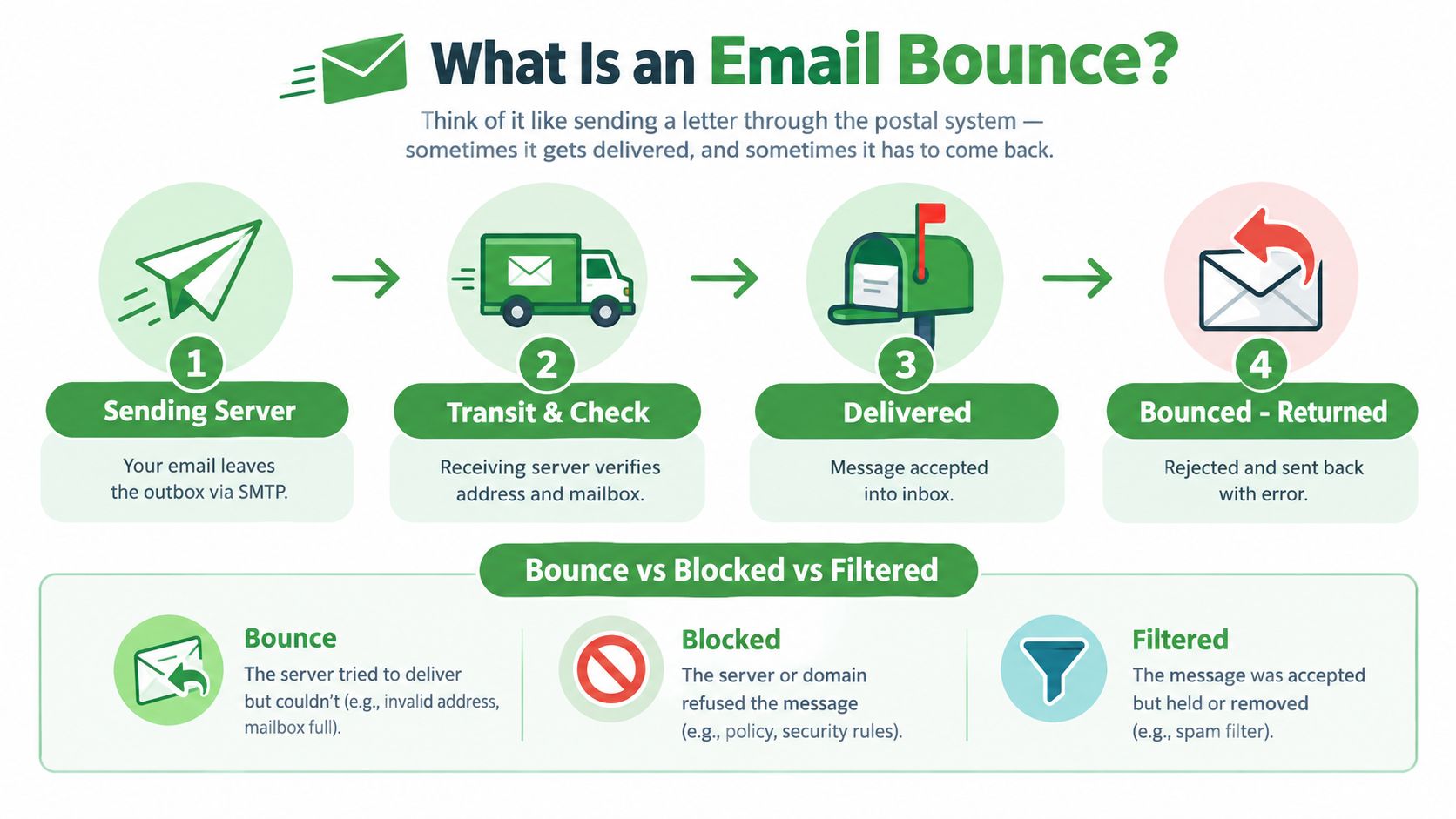
Your message leaves your sending server, then the recipient's server decides what to do with it. In SMTP terms, that handoff is the normal path for email delivery. A bounce happens when the receiving server refuses the message and sends it back.
The server can answer in only three ways. It can accept the message, refuse it, or accept it and filter it later. That last case is why people sometimes see an email “sent” even though it never reaches the inbox.
A concrete sender scenario makes this easier to see. You send a campaign, the message reaches the recipient's server, and the server rejects it because the address does not exist, the mailbox is full, or the message fails a policy check. The bounce notice is the clue. It tells you the handoff failed.
Bounce, block, and spam are not the same thing
A bounce means the message was refused during delivery. A block means the receiving system chose not to accept it, often because of reputation or policy. A message that lands in spam was usually accepted first, then filtered out of the inbox.
That difference matters because hidden deliverability loss can look healthy on the surface. As noted earlier, the Canadian benchmark showed that many messages still miss the inbox because of trust, relevance, and compliance filters, even when the sending side looks technically fine. A low bounce rate does not prove strong inbox placement.
Why bounces protect both sides
Receiving systems use bounce logic to protect mailboxes from bad addresses, oversized messages, and suspicious traffic. Sender systems use it to avoid wasting effort on mail that will never arrive. Like a return label on a parcel, the bounce notice protects the route and shows where the delivery failed.
For Canadian senders, that signal also connects to compliance and trust. Strong authentication, clean consent records, and accurate lists reduce the chance that a server rejects your mail before the inbox ever sees it. That is why bounce handling is part of healthy email operations, not a sign that something is always broken.
Practical rule: if a message was never accepted, treat it as a delivery problem. If it was accepted but not seen, treat it as an inbox-placement problem.
Once you separate those two outcomes, bounce notices become easier to read. You can tell whether you need to fix an address, retry later, or look deeper into authentication and consent.
Soft bounce vs hard bounce
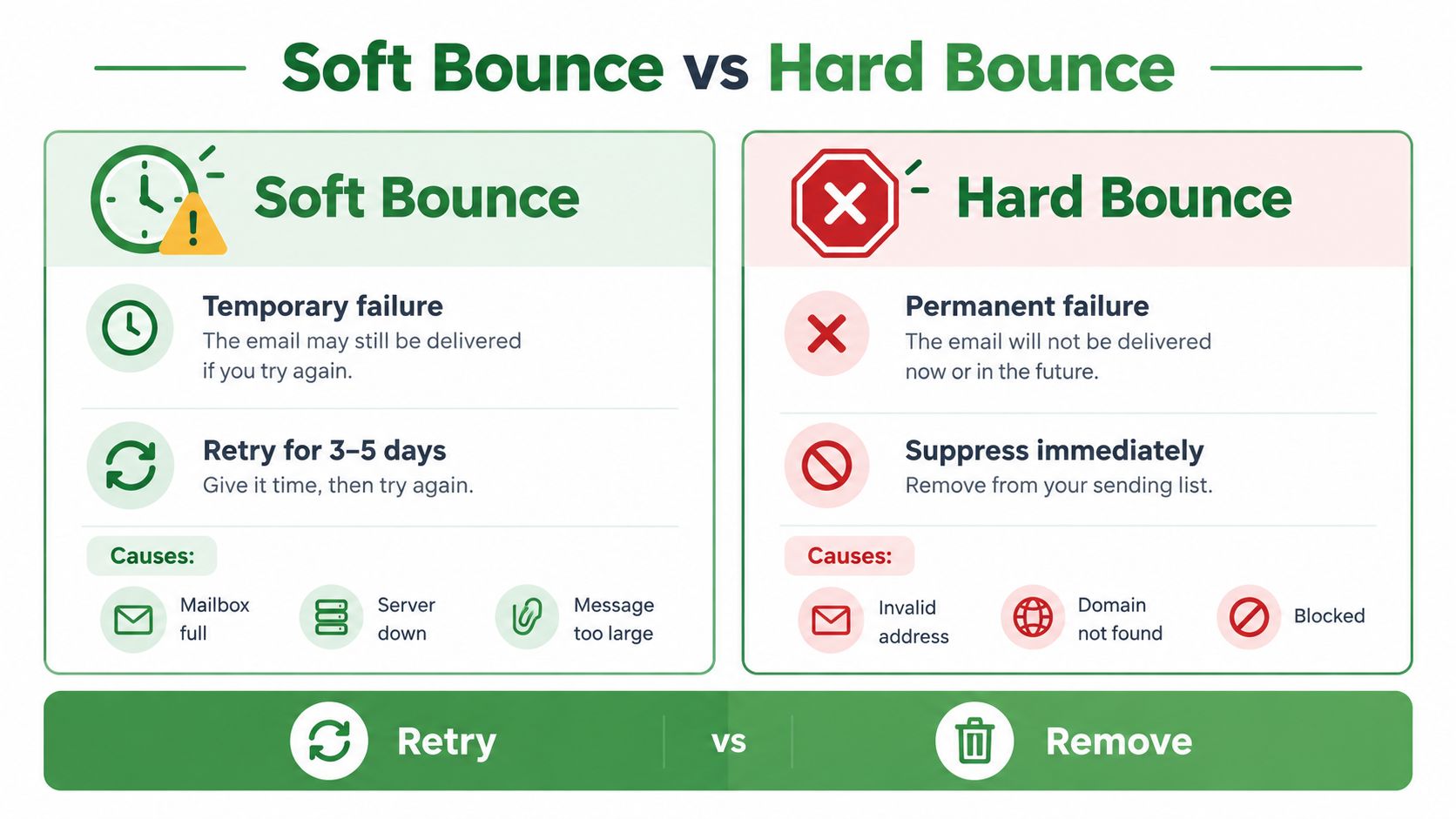
A soft bounce is temporary. A hard bounce is permanent. The label matters, but the response matters more, because each one sends you toward a different fix and affects your sender reputation in a different way.
| Feature | Hard Bounce | Soft Bounce |
|---|---|---|
| Meaning | Permanent delivery failure | Temporary delivery failure |
| Common outcome | Remove or suppress the address | Retry later and watch for repeats |
| Typical cause pattern | Invalid address, bad domain, permanent rejection | Full mailbox, busy server, message issue |
| Risk if repeated | High, because the address will not recover | Medium, because repeated soft failures can become a list-quality problem |
| Best action | Suppress immediately | Retry for a short period, then review |
A hard bounce is like a parcel returned to sender because the street number does not exist. There is no useful retry. Remove the address so future sends do not keep hitting the same dead end.
A soft bounce is different. The mailbox may be full, the server may be busy, or the message may have hit a temporary issue. In those cases, a retry makes sense, but only for a short time.
How to decide what to do
If the address does not exist, stop sending to it. If the mailbox is full or the server is unavailable, give the system time to clear and try again later.
One failed send is not the whole story. A mailbox can be full for a day, while an invalid address will stay invalid. If the same contact keeps soft-bouncing, treat it like a hard bounce in practice and suppress it.
Why list hygiene wins here
Hard bounces are the clearest sign of stale list data. Keeping them active adds noise to future campaigns and makes clean reporting harder. Soft bounces are more forgiving, but repeated ones still point to a list that needs attention.
If a contact keeps failing for the same reason, stop treating it as a one-off.
For small teams, the rule is simple. Remove hard bounces right away, retry soft bounces only for a short window, and suppress anything that keeps failing. That keeps your list cleaner and helps protect deliverability without extra complexity.
For a quick visual walkthrough of the retry-versus-remove decision, watch this short explainer.
Common bounce reasons
Bounce reasons usually fall into three groups, recipient-side issues, sender-side issues, and policy-side issues. That grouping helps you stop blaming the wrong thing. A full mailbox and a failed authentication check need very different fixes.
Recipient-side problems
The easiest case is a bad address. Someone mistyped the domain, closed the mailbox, or never had that address in the first place. A mailbox can also be full, which is temporary, but it still blocks delivery until the recipient clears space.
These are the kinds of problems that show up when lists get old. People leave jobs, change providers, or stop checking an address they once used. If your list came from a form, a trade show, or a manual import, old data often shows up here first.
Sender-side and policy-side problems
Authentication failures matter too. The Canadian Centre for Cyber Security says an email can pass DMARC only if it passes SPF or DKIM, and the domain used in those checks must align with the domain in the From field. If an email fails both SPF and DKIM, it fails DMARC (Canadian Centre for Cyber Security DMARC guidance).
That matters because some messages do not bounce for bad addresses, they bounce because the receiver does not trust the sender. Consent and list quality matter here as well, especially under CASL expectations in Canada. A list built on weak consent or stale contacts creates more delivery friction, more filtering, and more avoidable failures.
If you want to understand whether a failure is caused by trust, domain setup, or list quality, start with the bounce wording first and the code second. The message usually points you toward the right bucket before you go deeper into logs or headers.
A sender can waste time if they only look at one metric. A Canadian deliverability benchmark noted that roughly 15% to 20% of emails can miss the inbox, while another benchmark put Canadian bounce rate around 2.19%, so the bounce itself is only part of the failure path (Cyberimpact deliverability statistics). If you want to reduce failures properly, you need both list hygiene and trust signals.
For setup work, this guide on SPF is useful: how to create an SPF record.
Reading a bounce-back message
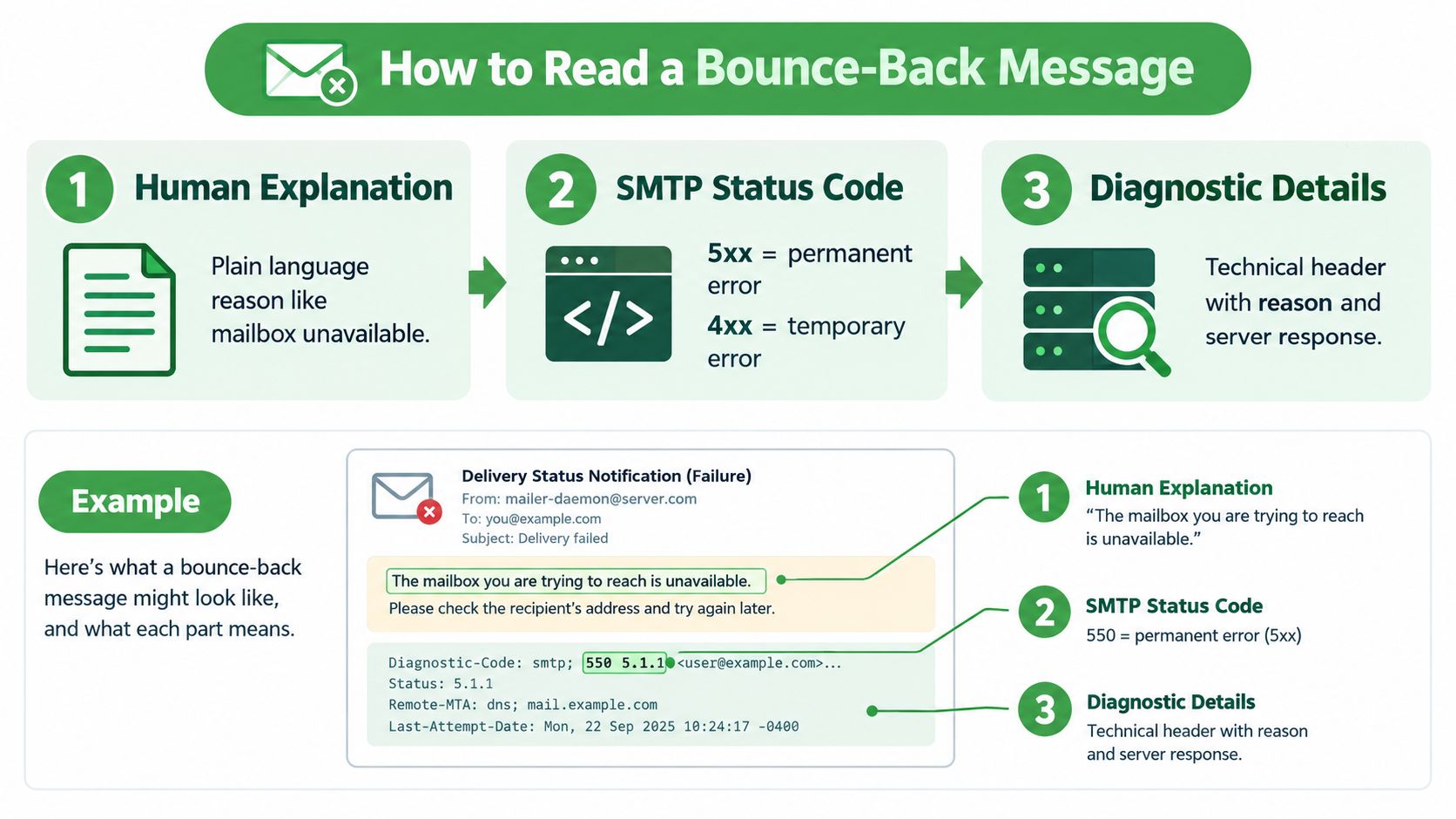
A bounce-back message usually has three parts. The first part is a plain-language explanation. The second is an SMTP status code. The third may be a diagnostic line or server detail that explains the failure more precisely.
The three parts that matter
Start with the plain-language line. It might say the mailbox is full, the user does not exist, or the server is unavailable. Then check the code. That tells you whether the problem is temporary or permanent.
4xx codes usually point to temporary failures, which fit soft bounces. 5xx codes usually point to permanent failures, which fit hard bounces. 421 often signals a temporary issue, 550 often signals a permanent rejection, and 552 can point to mailbox or size-related problems, depending on how the receiver phrases its reply.
Practical rule: read the human message first, then the code, then the technical detail.
How to spot the useful parts quickly
Look for the original recipient address if it appears. That helps you separate a typo from a stale contact. Look for the reporting server name. That shows which mailbox provider made the decision. Then read the reason phrase. That usually tells you whether the failure came from content, trust, or availability.
The same code can still appear with different wording across providers. Gmail may return a 550-5.7.1 code with a policy explanation, while Microsoft often phrases a similar rejection as 550 5.7.1 Access denied. The number tells you the class of failure. The wording tells you what the provider cared about.
For header reading, this guide helps: how to read an email header and spot a fake sender.
The Canadian Centre for Cyber Security notes that DMARC policy can be set to none, quarantine, or reject, and that a p=reject policy causes the message to be rejected or bounced back to the sender (ITSP.40.065 v1.1). A bounce can reflect policy enforcement, not just a bad address. That is why low bounce counts can still hide inbox placement trouble. Authentication and consent work on the root cause, not just the symptom.
How to reduce your bounce rate
A lower bounce rate starts before the send button is pressed. Clean lists, strong authentication, and steady sending habits all pull in the same direction. If one weakens, the others have to do extra work.
Build cleaner lists from the start
Double opt-in helps because it confirms that the person who signed up wants your mail. That lowers bad addresses and cuts down on low-quality contacts. Regular verification and suppression handling do the rest, especially when old addresses keep surfacing as failures.
Consent matters here too. A list built with care is less likely to contain abandoned inboxes, fake signups, or people who never wanted your messages. Better consent usually leads to better engagement, and better engagement supports inbox placement.
Authenticate before you scale
The Canadian Centre for Cyber Security's guidance, cited above, advises SPF and DKIM on all domains, DMARC monitoring, and annual DKIM key rotation. That setup takes time, but it gives receiving servers a clearer trust signal.
On a provider with unlimited sending, volume growth is not capped, so list quality and authentication become the primary constraints. You do not run into a provider-side sending wall that interrupts launches or campaigns. The limit shifts to how well you manage your audience and your domain signals.
Warm up send volume with care
Sudden bursts from a cold sending pattern can look suspicious. A gradual warm-up helps mailbox providers see steady behaviour instead of a spike that resembles abuse. That matters for small businesses that send in batches rather than on a fixed schedule.
Typewire is one option in this space because it runs its own infrastructure in Vancouver and hosts email in Canada under Canadian privacy law. That can help teams keep mail under domestic jurisdiction while they work on authentication, consent, and list hygiene.
Monitoring deliverability and next steps
Bounce rate is only one metric to watch. You also need inbox placement, spam placement, and missing mail, because a message can fail without ever bouncing. That's the main reason teams get misled by a low bounce number.
A 2025 benchmark reported 86.7% inbox placement, 5.4% spam placement, and 7.9% missing mail for Canada, with Gmail at 94.4%, Microsoft at 78.9%, and Yahoo/AOL at 88.6% (Validity 2025 Benchmark Report). Those figures show why you should track results by mailbox provider instead of relying on a single overall number.
What to watch month to month
Start with a baseline for your own sending, then compare each campaign against it. Watch where delivery drops by provider, because one mailbox system may tighten filtering before the others do. DMARC reports and reputation tools help you see problems early, before they turn into repeated bounces or silent inbox loss.
A healthy bounce rate can still hide a weak delivery path.
If you want to connect authentication work to real delivery outcomes, this guide on sender authentication is a useful companion: email sender authentication and deliverability. It pairs well with the bounce-reading habits above because it helps you connect technical setup to inbox placement.
FAQ: Email Bounces
What's a normal bounce rate?
Canadian email benchmarks put the average hard bounce rate around 0.27% to 2.19%, depending on list age and sending frequency. That sounds low, but it masks the bigger picture. The same benchmarks show that 15 to 20% of emails still miss the inbox because of trust, relevance, and filtering issues, even when they don't bounce. A low bounce count doesn't mean strong deliverability. It just means the message reached the receiving server. Focus on inbox placement rates by provider, not bounce rate alone.
What's the difference between a bounce and a message going to spam?
A bounce means the receiving server rejected the message during delivery and sent it back. A spam filter means the server accepted the message but filed it away from the inbox. A bounce is fast, visible feedback. A message in spam is silent. You might never know it happened unless the recipient complains. That's why bounce rates can look healthy while inbox placement crumbles. Both are deliverability problems, but they need different fixes.
How many times should I retry a soft bounce before giving up?
Retry soft bounces once or twice over the next 24 to 48 hours. If the same contact bounces three times in a row for the same reason, treat it like a hard bounce and suppress it. A mailbox that stays full for a week usually has a bigger problem. Don't waste sending volume on an address that keeps failing. List quality matters more than retry volume.
Why do I need to worry about bounces if my provider handles them?
Your provider can log bounces and flag them, but you own the decision about whether to retry or remove an address. More importantly, repeated bounces hurt your sender reputation over time. If your list contains hundreds of invalid addresses that keep bouncing, mailbox providers start viewing your domain as less trustworthy. Clean lists protect your domain reputation. Providers give you the tools, but you drive the hygiene.
Can better authentication actually reduce my bounce rate?
Not directly. Authentication (SPF, DKIM, DMARC) doesn't stop bounces caused by bad addresses or full mailboxes. What it does is prevent bounces caused by trust failures. Some messages bounce because the receiving server doesn't trust the sender, not because the address is bad. Strong authentication tells servers "this mail is legitimate," so they're less likely to reject it upfront. The Canadian Centre for Cyber Security recommends SPF and DKIM on all sending domains for this reason.
Should I use double opt-in to reduce bounces?
Yes. Double opt-in confirms that the person who signed up actually wanted your mail and that the address is real. Single opt-in lists often contain typos, fake addresses, and low-quality signups. Double opt-in costs you a few initial subscribers, but the list you build is cleaner and delivers better. That means fewer bounces, better engagement, and stronger inbox placement overall.
If I host email in Canada, does that change how I handle bounces?
No, the bounce mechanics stay the same. SMTP standards are universal. What changes is that Canadian hosting under PIPEDA gives you clearer jurisdiction and control over your data while you manage list quality and authentication. Canadian providers like Typewire also mean you're not subject to U.S. government access to your sending records. The technical handling of bounces stays the same, but the privacy and compliance context improves.
How do I know if a bounce is caused by my domain authentication or my list quality?
Read the bounce message wording first. If it says "user does not exist" or "no such mailbox," it's a list quality problem. Remove the address. If it says "access denied," "policy violation," or "authentication failed," it's likely a domain trust problem. Check your SPF, DKIM, and DMARC setup. You can also use DMARC reports and email authentication monitoring tools to see which messages are failing due to policy enforcement versus bad addresses.
For Canadian teams, the larger lesson is practical. Good bounce handling, better authentication, and stronger consent practices keep mail cleaner under PIPEDA-aware operations and make it easier to spot real problems early. If you want private email infrastructure that keeps your mail in Canada and gives you room to manage deliverability properly, visit Typewire and see how our email service fits small business sending, custom domains, and privacy-first operations.
The post Email Bounce Explained: Soft vs Hard Bounces & How to Fix Them appeared first on Typewire.
Email Bounce Explained: Soft vs Hard Bounces & How to Fix Them
Posted: 2026-10-02
Which Secure Email Provider Fits Your Workflow? 10 Options by Use Case
Posted: 2026-09-29
Personal Data Privacy: Why Your Email Is the Master Key to Your Digital Life
Posted: 2026-09-24
Secure Email Gateway Guide: Do You Need One?
Posted: 2026-09-23
Average Email Deliverability Rate: 2026 Benchmarks
Posted: 2026-09-18
Phishing vs Spam: What’s the Difference?
Posted: 2026-09-15
PIPEDA vs GDPR Key Differences for Businesses
Posted: 2026-09-11
CASL Express vs Implied Consent: What’s the Difference?
Posted: 2026-09-08
Moving Away from Big Tech Email and How to Make the Transition Smooth. Here’s How:
Posted: 2026-09-04